Setup
IPTV Smarters Pro: Download, Setup and Versions Explained
Where to get IPTV Smarters Pro from the developer, which build runs on your device, the three login methods, and what each common error message means.
The Best IPTV USA desk, Sports plan comparisons and setup guides Updated September 28, 2026
Game coming up? Start VIPSATV’s free trial and check the channels you follow on your own connection first.
IPTV Smarters Pro is a free player app, not a channel service. Get it from the developer, WHMCS Smarters, load a login from a provider you already pay for, and you have a working guide in about five minutes. That one distinction explains most of the confusion online, and it decides what to expect from the app. This page covers where each build comes from, which version fits your device, how the three login methods work, and what every error message actually means.
Everything here comes from the developer’s own site and App Store listings, plus Amazon’s documented Fire TV settings. The screenshots are the developer’s. Nothing on this page depends on which IPTV provider you use; the app works the same way with any of them.
Where to download IPTV Smarters Pro
The developer is WHMCS Smarters, and its own site is the source for the builds that are not in an app store. Search results and the Play Store both carry look-alike listings with similar names and icons, so start with the developer.
| Device | Which build | Where it comes from |
|---|---|---|
| Android phone, tablet, Android TV, Google TV | IPTV Smarters Pro (APK) | WHMCS Smarters developer site |
| Fire TV Stick, Fire TV Cube | IPTV Smarters Pro (APK) | Sideload with Downloader, using the developer’s APK address |
| iPhone, iPad | Smarters Player Lite | App Store |
| Apple TV | Smarters Player Lite | App Store, same listing, tvOS build |
| Mac | Smarters Player Lite (App Store) or the Pro desktop installer | App Store, or the developer site |
| Windows | IPTV Smarters Pro for Windows | Developer site |
| Samsung and LG smart TVs | Smarters Player Lite where the TV’s store carries it | The TV’s own app store; otherwise a streaming stick is faster |
Two things to know before you install anything. Play Store listings under the Smarters name come and go, which is why the APK from the developer is the dependable route on Android. And the Amazon Appstore does not carry the app at all, so on a Firestick it is always a sideload.
Pro, Player and Lite: which version you actually want
The names cause more support tickets than the app does. The developer ships two current products, and everything else you will see is an older build or someone else’s app wearing a similar name.
| Name | What it is | Platforms | Cost |
|---|---|---|---|
| IPTV Smarters Pro | The full player: live, movies, series, catch-up, multi-screen, EPG settings, parental controls | Android, Fire TV, Windows, Mac | Free |
| Smarters Player Lite | The App Store build: same logins, lighter feature set, lower memory use | iPhone, iPad, Apple TV, Mac, some Samsung and LG sets | Free to install; some platforms show a one-time activation, check the listing |
| IPTV Smarters Player | The older basic Android build that predates Pro | Android | Free |
For a living-room TV running Android or Fire TV, install Pro. For anything Apple, Player Lite is the only official route and it does the job. If you are choosing between the two on the same device, our Smarters Lite vs Player Pro comparison sets out the differences feature by feature. If the storage on an ageing Firestick is tight, Pro is still small enough; it is the channel guide, not the app, that fills memory.
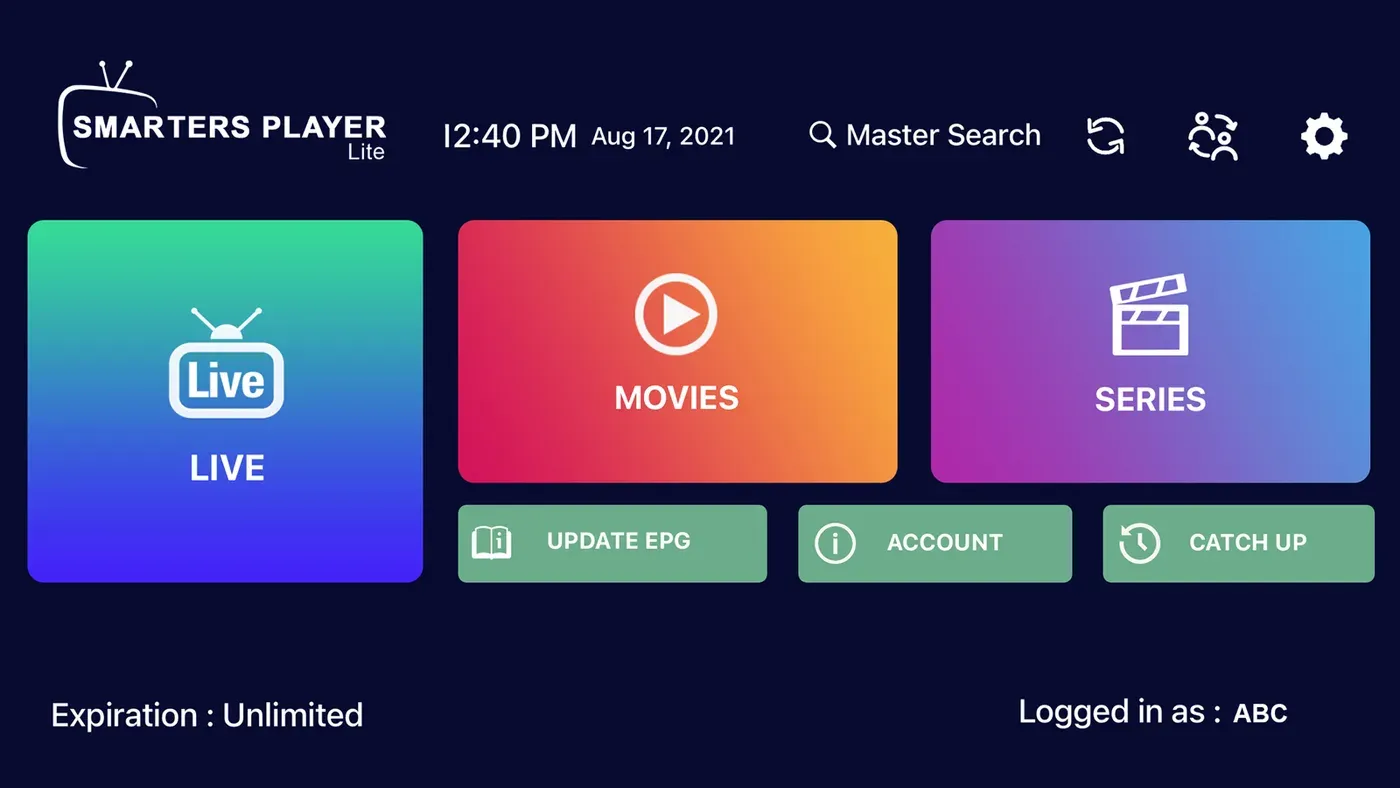
The home screen after login: Live, Movies and Series, with the EPG refresh, account details and catch-up one tap away. Screenshot: WHMCS Smarters, App Store listing.
Installing on a Firestick, step by step
Amazon does not list the app, so you sideload it. This is a standard Firestick setting, not a modification, and it takes under ten minutes.
- Settings → My Fire TV → Developer Options → Install Unknown Apps, then turn it on for Downloader. If Developer Options is missing, open My Fire TV → About and press the device name seven times.
- Search the Amazon Appstore for Downloader, install it, open it and allow storage access.
- In Downloader, enter the APK address from the WHMCS Smarters site and press Go. Codes and short links that circulate online are just shortcuts to an address; when one fails, it has expired.
- When the download finishes, press Install, then Open.
- Log in with whichever of the three methods below your provider gave you.
The general Firestick steps, plus the settings that matter for live sport, are in our sports-on-Firestick setup guide. Android TV and Google TV skip steps 1 to 3 entirely: install the APK, or the Play Store listing if it is currently up, and go straight to login.
The three ways to log in
When the app opens for the first time it asks how you want to add a user. Your provider hands you exactly one of these.
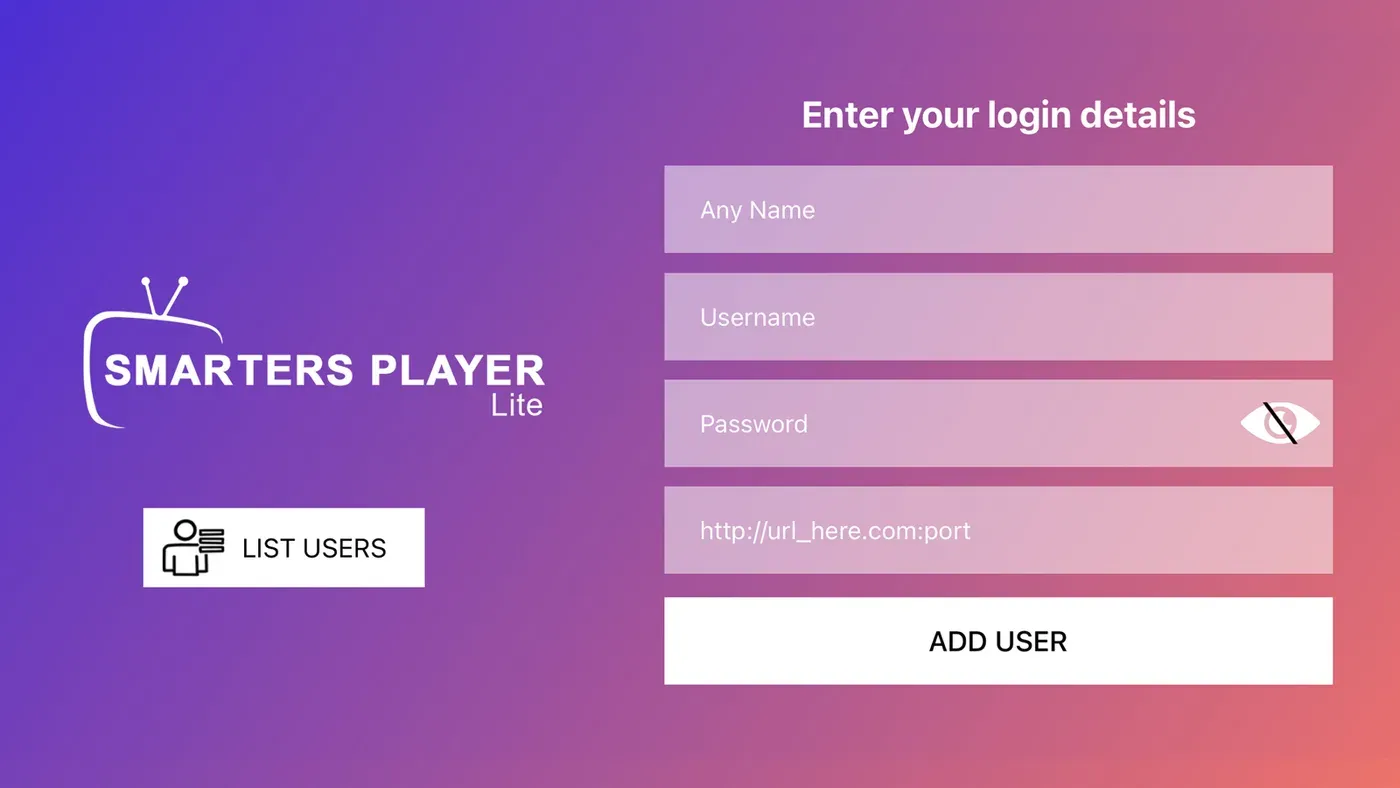
The Xtream login screen. The fourth field wants the full server address, port included, exactly as your provider sent it. Screenshot: WHMCS Smarters, App Store listing.
Xtream Codes API. Three fields: a name for the profile (anything), then the username, password and server address from your welcome email. Type the server address exactly, including http:// and any port number after the colon. This is the smoothest route: channels, movies, series and the guide all arrive together.
M3U playlist. One long link. Paste it, do not retype it, and add the EPG address in the playlist settings if the guide does not fill in on its own. This route works everywhere but the guide is one more thing to configure.
Activation code. Some providers register the app’s device ID on their side and give you a short code. Enter it on the login screen. You will see this mostly on Apple devices and provider-branded builds.
The first load pulls the full channel list. On a large service that is a minute or two, once. Every load after that is instant.
Settings worth changing before game night
Out of the box the app is fine. Four settings are worth knowing about before a packed evening of live sport.
- Decoder: hardware first. Under playback settings. If one channel shows a black screen with audio, switch that channel alone to software decoding.
- Buffer size: one step up if the device is on Wi-Fi rather than a cable.
- Auto-play last channel: on, so the app resumes where you left it instead of the home screen.
- EPG time shift if the guide runs an hour out. Match it to your time zone rather than guessing.
Then wire the device if you can. On the Firestick that is a cheap Ethernet adapter; on a Shield or a laptop it is the port on the back. A cable removes one of the most common causes of stutter at home, which no setting inside the app can do.
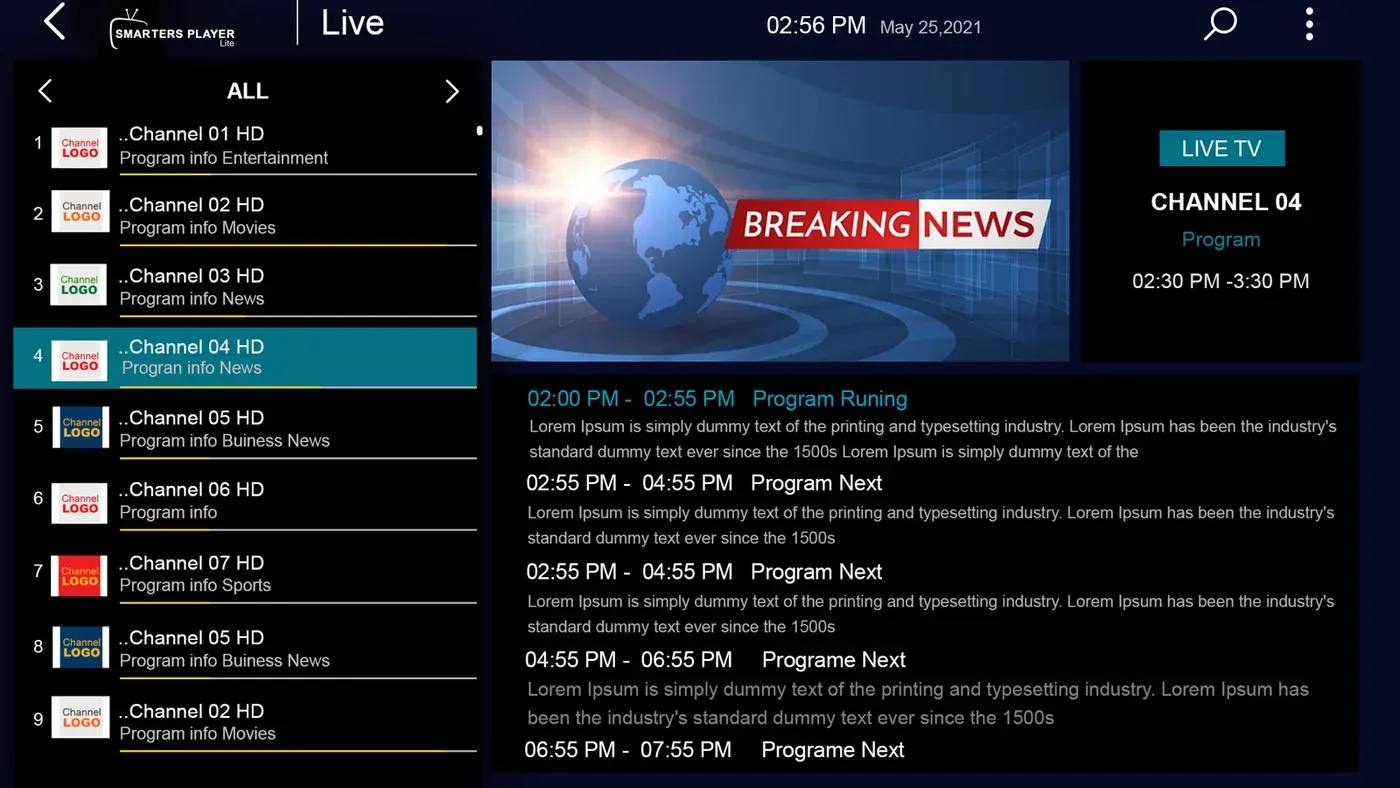
Live TV with the guide populated: channel list, the stream, and now-and-next underneath. If this grid is empty on your setup, the fix is in the error table below. Screenshot: WHMCS Smarters, App Store listing.
What each error means, and the fix
| What you see | What it means | Fix |
|---|---|---|
| Invalid Details, or Unauthorized | Server address, username or password does not match | Re-enter all three. Look for a trailing space, a missing http://, or a port left off the server address |
| Your account has expired | The subscription behind the login is out of date | Renew with the provider; the app cannot fix this |
| Channels load, nothing plays | Someone else is using the connection, or the server is overloaded | Check the connection count on your plan; test a second channel; try again in a minute |
| Guide is blank | No EPG data reaching the app | Xtream login: refresh the EPG in settings. M3U: paste the EPG address. Still blank: the provider’s guide is thin |
| Black screen with sound on one channel | Decoder mismatch on that stream | Switch that channel to software decoding |
| Buffering on everything | Your connection, not the app | Wire the device, clear the app cache, close background apps, speed-test at the hour it happens |
| App crashes on open after an update | Cached data from the old version | Clear cache and data in the device settings, reopen, log in again |
Most of that table is the connection or the login. The app itself is rarely the cause.
Setting up IPTV Smarters Pro on other devices
The login screen is the same everywhere; only the install differs.
- Windows. Download the Windows installer from the developer’s site, run it, and log in. If Windows SmartScreen warns about an unrecognised app, check that the file came from whmcssmarters.com before choosing to run it anyway.
- Mac. Install Smarters Player Lite from the App Store, or use the desktop installer from the developer’s site.
- iPhone and iPad. Install Smarters Player Lite from the App Store and log in with your Xtream details or M3U link. Apple devices do not take APK files, so ignore any guide that says otherwise.
- Samsung and LG TVs. Look for Smarters Player Lite in the TV’s own app store. Availability varies by model and region; if it is not there, a streaming stick plugged into the TV is the quicker route.
- Android phones and tablets. Install the APK from the developer, allowing installs from that source when Android asks, or use the Play Store listing if it is currently up.
Multi-screen, catch-up and recording
The Pro build lists a multi-screen view for watching more than one channel at once, catch-up for channels where the provider offers it, and recording where the provider and device support it. All three depend on the subscription: a multi-screen view uses one connection per stream, so a single-connection plan cannot fill two windows, and catch-up only appears on channels the provider archives. If one of these features is the reason you are installing the app, ask your provider whether its plan supports it.
The line behind the player
That is the part this page cannot do for you. The app is settled; the subscription and your connection decide how the picture behaves at kickoff, and a free trial is the way to find out on your own setup.
The top of our table is VIPSATV, which lists setup through standard player apps and runs a 24-hour trial that takes an email and no card, so you can try this app with it before paying. If you want the wider field before you commit, our best IPTV for sports in the USA table compares all four services on published prices, catalogue sizes and trial terms, and the free trial comparison shows how each trial starts.
The bottom line
Install Pro on Android or Fire TV, Player Lite on anything Apple, both from the developer or the App Store rather than a look-alike listing. Log in with the Xtream details if your provider offers them, wire the device, and try the subscription behind it on a real game before you commit. For the Firestick-specific walkthrough see our sports-on-Firestick setup guide, and if picture quality is the thing you care about, the 4K live sports guide explains what a 4K sports picture needs.
Player installed. Now put a line behind it
The app is the screen; the subscription is the feed. VIPSATV lists a free trial (24-hour trial), so you can try this exact setup on your own connection before anything is paid.
Start the free trialWorth knowing
The player and the subscription are two purchases
IPTV Smarters Pro is a dashboard. It reads the login or playlist you give it, arranges everything into live TV, movies, series and catch-up, and pulls in guide data. Nothing streams until a working subscription is behind it, and the app has no channels of its own.
That separation is useful once you see it. When a match buffers or a channel drops, the fault almost always sits with the provider's servers or your own connection. Swapping the player will not touch either. Diagnosing gets easier once you stop blaming the app for content it never controlled.
It also means you pick the two halves separately. Choose the player for its layout and stability on your device; choose the provider for stable servers and complete guide data. Both decisions matter, and this page is only about the first.
Why the same app behaves differently on two evenings
On a quiet afternoon almost any setup looks perfect. The strain arrives when a large audience opens the same feed at the same second, which on a weekend means kickoff and the walkouts before a main event. That is when an underpowered server stutters regardless of how fast your own line is.
The second variable is your home network. A streaming stick behind a television sits in the worst spot in the room for a wireless signal. A wired connection, or at least the 5 GHz band with the router in sight, removes the most common cause of stutter before you blame anyone.
So prepare before the event, not during it. Confirm the login loads, confirm the guide is populated, put the device on its most stable connection, and leave one channel running for a while at the hour you actually watch. A quiet check midweek saves a scramble at the weekend.
Questions people ask
Is IPTV Smarters Pro free?
Yes. The app itself costs nothing to download or use. What you pay for is the subscription you load into it, which comes from a separate provider. Anyone selling the app, or advertising free channels through it, is not talking about the app.
Where do I download IPTV Smarters Pro?
From the developer, WHMCS Smarters, at whmcssmarters.com, which hosts the Android APK and the Windows and Mac installers. On iPhone, iPad, Apple TV and Mac, install Smarters Player Lite from the App Store. Search results and the Play Store both carry look-alike listings under similar names, so go to the developer first.
How do I install IPTV Smarters Pro on a Firestick?
Amazon does not list it, so it is a sideload: allow apps from unknown sources, install the Downloader app from the Amazon Appstore, enter the APK address from the developer's site, install, then open the app and log in. It usually takes about ten minutes.
What is the difference between IPTV Smarters Pro and Smarters Player Lite?
Same developer, two apps. Pro is the full player for Android, Fire TV, Windows and Mac, with multi-screen, catch-up, recording where the provider supports it and EPG settings. Player Lite is the App Store build for Apple devices and some smart TVs, lighter on features and resources. Both take the same logins.
What does the Invalid Details error mean?
The server address, username or password does not match what your provider issued. Nine times in ten it is a trailing space pasted into the server field, a missing http:// prefix, or a port left off the end of the address. Re-enter all three exactly as sent.
Why is the EPG guide empty?
The app only shows the guide data your provider sends. With an Xtream login the guide usually arrives automatically; with an M3U link you paste the EPG address separately in the playlist settings. If both are set and the grid is still blank, the provider's guide is thin, and no app setting fills it.